My role
UX research, Prototyping, User testing, UI Design, UX Design
Timeline
December 2022 – March 2023
Tools
Figma, Miro,
Google Jamboard
Platform
Mobile app
Grain App
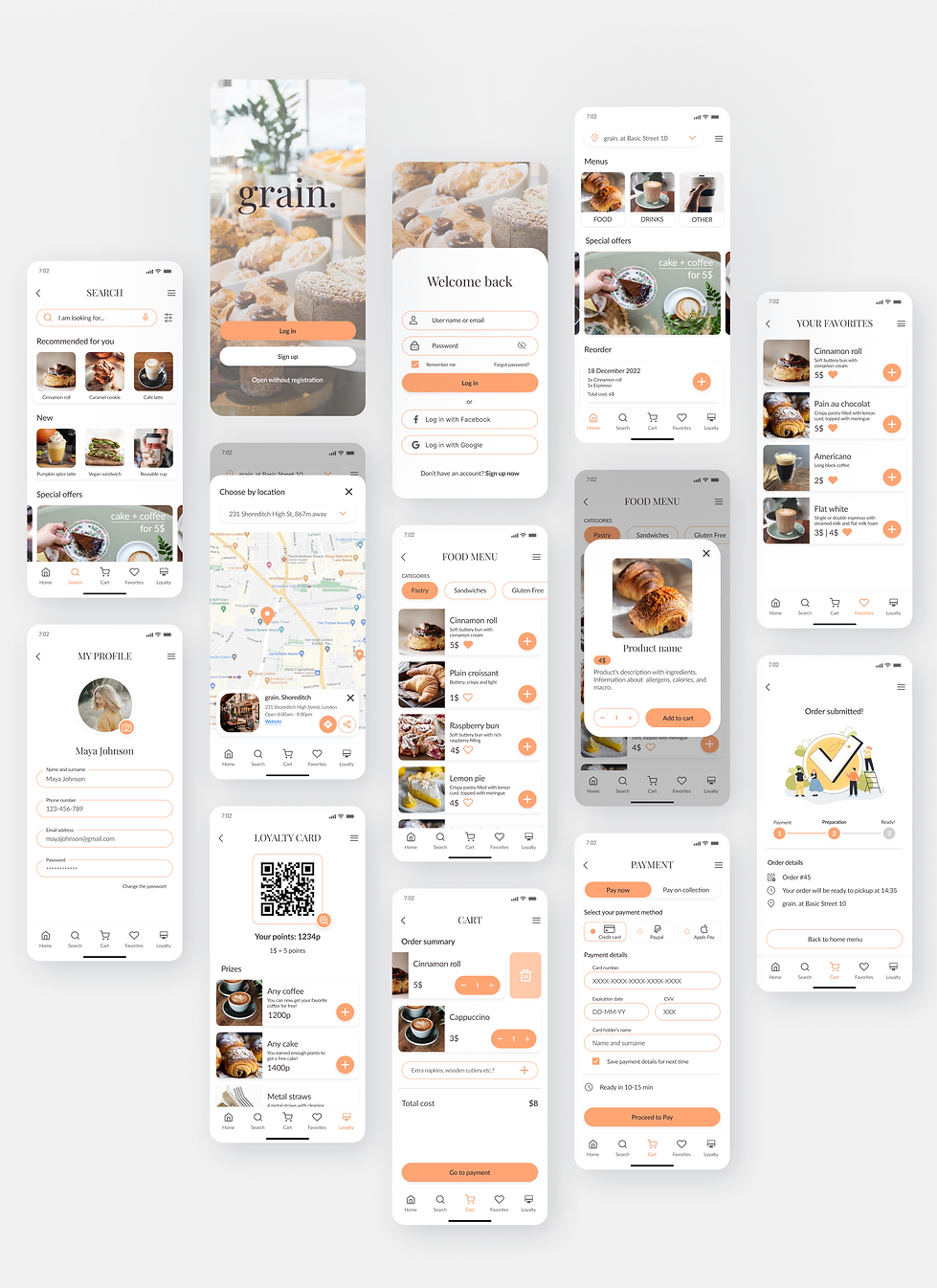
I created an app design for grain., a local bakery and cafe, to help their clients order baked goods and coffee online. The app focuses on placing online orders with personal collection, as well as creating stronger connection between the clients and the bakery through offering loyalty card.
Problem
In the fast-paced era people value convenience and quick solutions. People often grab their coffees and baked goods on-the-go, but at the same time they waste too much time standing in lines and waiting for their order to be picked up.
Goal
Creating a user-friendly ordering app that saves people’s time by eliminating the need to wait in lines.
Creating a strong client rapport by providing loyalty card and special offers that establish a lasting connection.
01
Research
In order to define personas, users’ pain points and create problem statements
I conducted a foundational research using 1:1 interviewing method.
The study included 11 participants – 6 males and 5 females between the ages 18-46, including one person with a visual impairment.
Key considerations:
-
How long does it take for a user to add products to the cart and complete the order in an ordering app?
-
What are the user’s frustrations during this process?
-
Are there any parts where users get stuck?
-
What can we learn from the user flow, or the steps that users take in order to complete an order?
-
What are other functions that users need in an ordering app?
User reseach: pain points
1
Waiting
Most users feel frustrated when they have to stand in line to place an order and then wait again for it to be picked up.
2
Limited choice
Users express their dissatisfaction with the limited product selection available on online platforms and the inability to utilize filters to narrow down their search for specific types of products.
Uncertainty
3
Users feel frustrated when they don’t know the exact time they need to wait for their order. Researches show that people are more relaxed when they know how long they need to wait for some results.
Competitive audit
I compared the features and user flow on both website and app of each competitor and created an aggregated report.
Direct competitors: Starbucks and Green Caffe Nero, international coffee chains,
and Cafe Forum, a friendly local cafe
Indirect competitor: Good Lood, a polish ice cream company
Their strengths
-
Fully responsive (except Starbucks)
-
Wide offering, including reusable cups
-
Clear menu both on Website and App
-
Great descriptiveness of products’ calories, nutrition and allergens
-
Great visual design, clear branding
-
Loyalty cards (points) with engaging tasks and bonuses
Their weaknesses
-
Online order only on Web or on App
-
No menu on App
-
Limited App features
-
No clear hierarchy
-
Boring App visual design
-
Poorly accessible menu
-
No prices on Web menu
-
Small fonts
-
Tab Bar difficult to access
Gaps
-
Ordering options either on Web or App
-
Limited categories such as gluten free, lactose free
-
‘My favorites’ feature
Opportunities
-
Provide quick and easy way to reorder past orders
-
Create engaging tasks and bonuses in the loyalty programme
-
Give information about allergens
-
Provide categories such as Gluten free etc.
02
Personas
After analyzing the data collected from user interviews, I identified two primary characteristics of potential users and developed two cohesive groups of personas. These personas effectively depict the needs and frustrations of users, providing valuable insights into their customer-related issues.
Group 1
Working young adults who are career-oriented, busy and always on the go.
These users:
-
Usually between 24 and 32 years old.
-
Focus on their careers and want to get promoted.
-
Often have additional obligations, hobbies or courses after work that make it difficult to have free time.
-
Would use an app to place orders while they are “on the go” and pick up the order on their way home.
Group 2
Working parents with children, sometimes with obstacles that make it more difficult to make orders online.
These users:
-
Vary in age, occupation, and number of family members in their home.
-
Often some family members are allergic (for example to gluten or lactose).
-
Sometimes non-native English speakers.
-
Would like an app that is readable, usable and doesn’t require high tech skills.
User journey map
I asked the participants to share their experiences regarding the usage of their most frequently used ordering apps. After collecting their feedback, I consolidated the data to create an aggregated user journey map.

03
User flow

04
Prototype
Lo-Fi wireframes
When creating digital wireframes, my objective was to devise a design that simplifies the process of completing the primary task, which is placing an order, while ensuring easy access to the app's features.
I wanted to create product menus that are easy to scan and navigate.
Users can filter products by categories and save time on looking for preferable products.


05
Test
Usability testing findings
To evaluate the prototype and identify any pain points experienced by users, I conducted moderated usability testing with 8 users (4 males and 4 females) between the ages 20-46, including one person with a visual impairment.
The respondents had to perform three tasks:
-
Pick one cake and one coffee of your choice and add them to the cart.
-
Choose a special offer and add it to the cart.
-
Go to your profile settings.
1
Round 1 findings
Special offers page was confusing – I redesigned this page and included more detailed information about the offered products. Each offer has “Add to cart” button.
Loyalty card icon wasn’t clear –
I changed the appearance of the Loyalty Card tab icon. I based my choice on the competition audit that I conducted.
2
Round 2 findings
Swiping – most participants would like to swipe around the app, in addition to tapping.

Results
5 out of 5 users completed their tasks during final usability testing:
-
Picking one cake and one coffee of their choice and add them to the cart.
-
Choosing a special offer item and adding it to the cart.
-
Checking profile settings.
-
Opening loyalty card.
Impact
Kasia
"The app is very intuitive and easy to use. It looks better than most apps that I’m currently using."
Marcin
“I love that I can use loyalty card and collect points. Also, I like the colors, the app looks very energetic.”
06
UI elements
Visual layer
Color palette
Given the purpose, target audience, and sector, my aim was to create an app that is vibrant and cheerful, while ensuring the readability of the content. Taking these factors into account, I opted for a shade of orange, which is associated with energy and optimism. This color is also often linked to food and good health, which was further validated through my subsequent usability testing.

Typography

Accessbility considerations
1
Font size
The smallest font size used in the project is 12px (used for descriptions) which is consistent with WCAG’s recommendations for mobile devices. The main text font size is 16px.
2
Color contrast
All the colors used in the project have been tested to pass color contrast requirements.
Hierarchy and layout
3
The hierarchy and layout of the app are readable, organized, and logical, as determined through usability tests and usability heuristics.

High fidelity mockups